
Download Transistor – AI‑Powered Podcast Transcription Tool
Overview
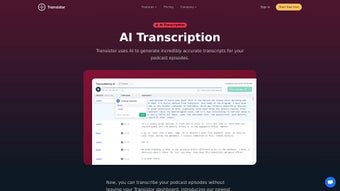
Transistor is a web‑based AI transcription solution built specifically for podcasters who need fast, accurate, and searchable text versions of their audio episodes. By leveraging advanced machine learning and natural language processing (NLP), Transistor turns spoken content into written scripts in a matter of minutes, allowing creators to focus on storytelling rather than manual typing. The platform offers automatic speaker detection, so each voice is clearly labeled, and a built‑in editing interface lets users correct any mis‑recognitions with a single click.
Timestamping is another core feature, enabling listeners to jump directly to any moment in the episode from the transcript, which dramatically improves accessibility and user engagement. Transistor supports a variety of export formats—including plain text, SRT, VTT, JSON, and HTML—so podcasters can embed transcripts on their websites, upload them to video platforms, or share them with SEO‑focused tools. While no AI can guarantee 100 % perfect accuracy, Transistor’s high‑precision engine combined with its intuitive editing workflow makes it one of the most efficient tools on the market for turning hours of audio into searchable, SEO‑friendly content.
Whether you run a solo show, a multi‑host network, or a corporate podcast, Transistor streamlines the transcription process, saving time, reducing costs, and enhancing the overall listener experience.
Key Features
- Automatic Speaker Detection: AI identifies and tags each speaker, making multi‑host podcasts easy to read.
- Accurate Timestamping: Every line is stamped to the second, allowing instant navigation to specific moments.
- Multi‑Format Export: Download transcripts as TXT, SRT, VTT, JSON, or HTML for maximum flexibility.
- One‑Click Global Editing: Edit a word once and have the change reflected throughout the entire transcript.
- Search‑Ready Text: Transcripts are fully searchable, boosting SEO and discoverability on Google.
- Secure Cloud Storage: All files are stored on encrypted servers, complying with GDPR and CCPA standards.
- Batch Processing: Upload multiple episodes at once and let Transistor handle them in parallel.
- Integration Ready: API hooks enable seamless connection with podcast hosting platforms, CMS, and workflow tools.
- Custom Vocabulary: Add brand‑specific terms or industry jargon to improve transcription accuracy.
- User‑Friendly Dashboard: Intuitive UI with drag‑and‑drop upload, progress bars, and real‑time preview.
Installation & Usage Guide
Getting started with Transistor is intentionally straightforward—there is no software to download, just a secure web portal. Begin by visiting the official Transistor website and creating a free account using an email address or single‑sign‑on (SSO) via Google or Apple. After confirming your email, you’ll be directed to the dashboard where the “Upload Episode” button awaits. Drag and drop your MP3, WAV, or M4A file, or paste a public URL from your hosting provider. Transistor’s backend automatically begins processing the audio; the average turnaround time is roughly one minute per five minutes of audio, though this can vary based on language complexity and speaker count.
Once the AI finishes, you’ll receive a notification and can open the transcript in the built‑in editor. The editor highlights speaker changes in different colors and shows timestamps on the left margin. To make corrections, simply click a word—any change you make propagates across the entire document, thanks to the “global replace” engine. If you need to add a missing speaker, use the “Add Speaker” button, assign a name, and the system will retroactively label all of that speaker’s utterances.
Exporting is a matter of selecting the desired format from the “Download” dropdown. For SEO purposes, choose HTML or JSON to embed the transcript directly on your episode page. For video subtitles, pick SRT or VTT.
Transistor also offers a “Copy to Clipboard” feature for quick pasting into note‑taking apps. Advanced users can generate an API key from the “Integrations” tab, allowing automated uploads from podcast hosting services such as Anchor, Libsyn, or Spotify. The API follows REST conventions, and detailed documentation provides example cURL commands for batch transcription.
Support is available 24/7 via live chat and a knowledge base that covers common troubleshooting steps, such as handling low‑quality audio or adding custom vocabularies. Because all processing occurs in the cloud, there’s no need for local hardware upgrades, making Transistor a truly “download‑free” solution for podcasters on any device.
Compatibility, Pros & Cons
Transistor is a cloud‑native web app, which means it works on any modern operating system that can run a browser. Whether you’re on Windows 10/11, macOS Ventura, Linux distributions, or mobile platforms like Android 13 and iOS 17, you’ll experience identical performance as long as you use an up‑to‑date browser (Chrome, Edge, Firefox, or Safari). No additional plugins or extensions are required, and the service is fully responsive, adapting to tablets and smartphones for on‑the‑go editing.
Pros
- Fast AI processing speeds reduce transcription turnaround time.
- Automatic speaker detection saves hours of manual labeling.
- Multiple export formats cover all common use‑cases (SEO, subtitles, data pipelines).
- Global edit feature eliminates repetitive corrections.
- Secure cloud storage meets GDPR and CCPA compliance.
- API access enables workflow automation for larger podcast networks.
- Intuitive UI requires virtually no training for new users.
Cons
- Accuracy can dip with heavy background noise or strong accents.
- Subscription pricing may be higher than basic manual transcription services for very low‑volume podcasters.
- No offline desktop client—reliant on an internet connection.
- Advanced customization (e.g., custom speaker models) is limited to higher‑tier plans.
Overall Rating: 4.5/5 – Transistor delivers a robust, AI‑driven transcription experience that fits the needs of modern podcasters while offering flexibility, security, and excellent integration options.
Frequently Asked Questions
How accurate is Transistor’s AI transcription?
Transistor achieves an average word‑error rate of 5‑7 % on clean audio. Accuracy improves with clearer speech, minimal background noise, and the use of the custom vocabulary feature for industry‑specific terms.
Can I transcribe multiple episodes at once?
Yes. The platform supports batch uploads, allowing you to queue several files simultaneously. Each file is processed in parallel, and you’ll receive individual notifications when each transcript is ready.
What file formats can I export my transcript in?
Transistor offers plain text (TXT), SubRip (SRT), WebVTT (VTT), JSON, and HTML exports. Choose the format that best matches your publishing workflow or SEO strategy.
Is my audio data safe and private?
All uploads are encrypted in transit (TLS 1.3) and at rest (AES‑256). Transistor complies with GDPR, CCPA, and SOC 2 standards, ensuring that your audio files and transcripts remain confidential.
Do I need a powerful computer to use Transistor?
No. Because the heavy lifting is done on Transistor’s cloud servers, any device capable of running a modern web browser—whether a low‑spec laptop, tablet, or smartphone—can create and edit transcripts without performance issues.
Conclusion & Call to Action
Transistor stands out as a purpose‑built transcription solution that blends cutting‑edge AI with a podcast‑centric workflow. Its automatic speaker detection, precise timestamping, and versatile export options give podcasters the tools they need to make content more searchable, accessible, and engaging. While no AI can guarantee flawless accuracy in every scenario, the platform’s editing suite and custom vocabulary feature mitigate most shortcomings, delivering a practical balance between speed and quality.
For creators who want to boost SEO, improve listener experience, and reclaim hours lost to manual transcription, Transistor is a worthwhile investment. Ready to transform your episodes into searchable text? Download Transistor now and enjoy a 14‑day free trial that lets you test the full feature set without commitment.



.png)



